Online Banking Safety: A Calm, Plain-English Guide for Over-50s
This article may contain affiliate links. If you make a purchase through these links, we may earn a small commission at no extra cost to you. This helps us keep creating free content.

Banks will never phone you and ask for your full password, your PIN, or a security code they just texted you. That single fact stops most of the scams aimed at people who bank online. If a call, text, or email asks for any of those, it is not your bank, no matter how official it sounds or which name shows on your screen.
Online banking is the same activity you already do at a branch, moved onto a screen you control. The money sits in the same regulated account, protected by the same laws. What changes is the front door: instead of a teller checking your face, the bank checks that the person logging in is really you. Most safety advice is simply about keeping that door locked and recognising the people who try to trick you into opening it.
This page walks through the habits that matter, the warning signs of a scam, what to do the moment you suspect something is wrong, and the small settings that quietly protect you. None of it requires being good with computers. It requires knowing a handful of rules and trusting them even when someone on the phone sounds urgent.
Start with a strong, separate password
Your banking password should be different from every other password you use. If you reuse the same one for email, shopping, and the bank, then a leak at any single shop hands a criminal the keys to your money. Banks are well defended. The weak point is usually a smaller website that got breached years ago, exposing a password you still use everywhere.
A strong password does not have to be a jumble of symbols you can never remember. Three random words joined together, such as copper-violin-harbour, are long enough to be very hard to guess and easy enough to type. Length matters more than strange characters. Avoid anything a stranger could find out: your surname, your street, your year of birth, or the name of a pet you mention on Facebook.
Turn on two-step verification
Two-step verification is the single most effective protection you can switch on. After you type your password, the bank sends a short code to your phone, or asks you to approve the login in the bank's own app. Even if a criminal somehow learns your password, they cannot get in without that second step, which lives on the phone in your pocket.
Most banks now turn this on by default, but it is worth checking. Look in the app or website under Settings, then Security or Login. If you see an option for a one-time code by text or an authenticator, make sure it is active. The few extra seconds at login are the price of a lock that scammers find very hard to pick.
Know how scammers actually try to reach you
Most fraud against bank customers does not break the bank's security at all. It tricks you into doing the work yourself. The criminal creates urgency and fear so you act before you think. Recognising the standard scripts removes their power. Here are the common approaches and the calm response to each.
| How they contact you | What they claim | The safe response |
|---|---|---|
| Phone call | "Your account has been hacked. Move your money to a safe account now." | Hang up. No real bank has a "safe account". Phone the bank back on the number on your card. |
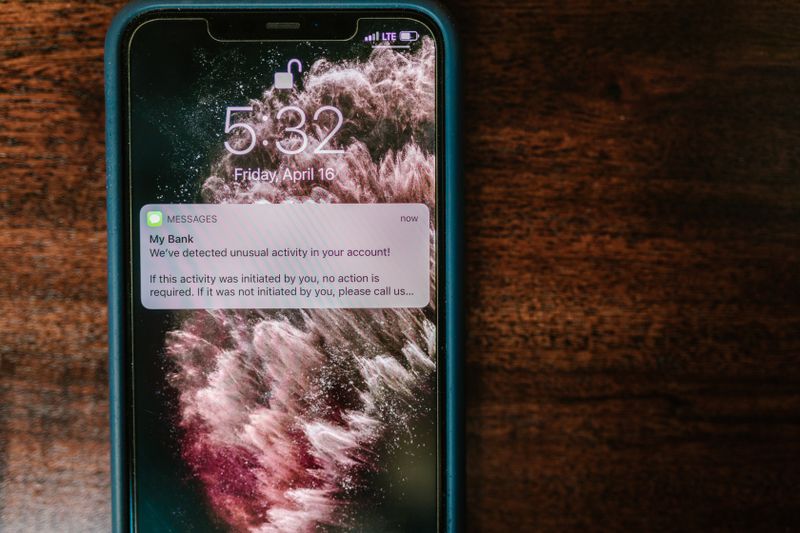
| Text message | "Suspicious payment detected. Tap this link to cancel." | Do not tap. Open the bank's own app yourself instead. |
| "Verify your details or your account will be closed." | Delete it. Banks never ask you to confirm a password by email. | |
| Pop-up on a website | "Virus found. Call this number for support." | Close the page. Never call numbers from a pop-up. |
The thread running through every safe response is the same. You contact the bank, using a number or app you already trust, rather than responding to whoever contacted you. A genuine bank is happy to wait while you call back. A scammer will push hard against any delay, because delay is exactly what defeats them.
Bank on a connection and device you trust
Do your banking on your own phone, tablet, or home computer, connected to your own home internet. Free public Wi-Fi in a cafe or airport is fine for reading the news, but treat it as a shared room where others might listen. If you must check your balance while out, use your phone's own mobile data rather than the cafe's Wi-Fi. The mobile signal is private to you.
Keep the device itself current. When your phone or tablet offers a software update, install it. Those updates often close security gaps that criminals rely on. The same goes for the banking app: let it update. An out-of-date device is the digital equivalent of a worn lock, and updating is free.
Use the bank's app instead of a search engine
Open your banking app by tapping its icon on your home screen, the small coloured square you set up when you joined. Do not reach your bank by typing its name into a search engine, because scammers buy adverts that sit at the top of search results and lead to fake copies of bank websites. Those fakes look identical and exist only to capture what you type.
If you prefer the website to the app, type the bank's address yourself into the address bar, or save it as a bookmark you can tap. Once you are in, check for the small padlock symbol next to the web address, which shows the connection is encrypted. The padlock alone does not prove a site is genuine, but its absence on a banking page is a clear sign to stop.
Check your statements and set up alerts
Look at your transactions roughly once a week. You are checking for anything you do not recognise, even small amounts, because fraudsters often test a stolen card with a tiny payment before attempting a large one. Spotting that test early can stop the bigger loss. This habit takes two minutes and catches problems long before a paper statement would arrive.
Most banking apps let you switch on alerts. You can ask the bank to text or notify you whenever money leaves your account, or whenever a payment over a chosen amount goes through. With alerts on, a fraudulent payment pings your phone the instant it happens, giving you the best possible chance to react. Set the threshold low enough to matter but high enough that everyday spending does not bury you in messages.
What to do the moment you suspect fraud
Act quickly and in order. Speed protects your money, because the sooner the bank knows, the sooner it can freeze the account and try to recover funds. Do not feel embarrassed. Bank fraud teams handle these calls every single day, and being targeted says nothing bad about you.
- Phone your bank straight away using the number printed on the back of your card, not a number from the suspicious message.
- Tell them clearly what happened and ask them to freeze the account or card.
- Change your banking password from a device you trust, once the bank confirms it is safe to log in.
- Report the scam to the relevant fraud-reporting service in your country so others can be warned.
- Keep any texts or emails as evidence rather than deleting them, until the bank says you no longer need them.
If money has already left your account through a scam, you may still get it back, particularly if the bank failed to protect you or you were tricked into authorising a payment. Rules vary by country, so ask the bank directly about its reimbursement policy. The important thing is to report fast and in writing.
Spotting a fake website or email at a glance
A fake banking website or email usually gives itself away in small ways once you know where to look. The web address is the first tell. A real bank's address is short and ends in the bank's own name, such as yourbank.com. A fake one often adds extra words or odd endings, like yourbank-security-login.com or yourbank.account-verify.net. If the address looks stretched or unfamiliar, close the page.
The wording is the second tell. Scam messages lean on fear and urgency, warning that your account will be closed in hours or that you must act immediately. They frequently contain small spelling and grammar mistakes that a real bank would never send. A genuine bank addresses you by your proper name rather than "Dear Customer", and it never asks you to confirm a password or full card number by email. When something feels rushed or threatening, that pressure itself is the warning sign.
Helping a partner or relative bank safely
If you help a spouse, parent, or friend with their banking, keep their login details under their own control wherever possible, and never share a security code on their behalf with anyone who phones. The safest arrangement is to sit beside them while they log in, rather than logging in for them from your own device. That way the account stays tied to the person it belongs to, and the bank's records stay clean.
For someone who cannot manage alone at all, most banks offer official options such as a third-party mandate or power of attorney, which let you help legally and properly. These are set up through the bank itself, not through sharing passwords. Ask your branch or the bank's helpline about the choices. Doing it the official way protects both of you, and it means the bank knows who is acting on the account if a question ever arises.
Scammers sometimes target the helper rather than the account holder, posing as the bank and asking you to "verify" a relative's details. Treat any such call the same way you would treat one about your own account. Hang up and phone the bank back on a trusted number. The rules in this guide protect the people you care for just as well as they protect you.
Frequently asked questions
Is online banking safe for someone my age?
Yes. Age has nothing to do with it. The protections are the same for everyone, and the habits on this page put you ahead of most people. Banks invest heavily in security, and the law protects regulated accounts. The risk lies almost entirely in being tricked, and you defeat that by following the rules above.
What if I forget my password?
Nothing breaks. Every bank has a "forgot password" link on its login screen. It confirms your identity with a code to your phone or by asking security questions, then lets you set a new password. You cannot lock yourself out permanently, and you certainly cannot lose your money by forgetting a password.
Can someone steal my money just by knowing my account number?
No. Your account number and sort code are the details you print on an invoice or give to an employer so people can pay you. They cannot be used to take money out. Withdrawing money requires your password and your second login step, which is why those are the details you guard so carefully.
Should I use a banking app or the website?
The app is usually the safer choice for everyday use. It connects directly to the bank and cannot be faked by a search advert the way a website link can. The app also supports fingerprint or face login, which is both quicker and harder for anyone else to use. Pick the app for daily banking and keep the website as a backup.
My bank called and the number matched. Is it definitely real?
Not necessarily. Criminals can make any number show on your screen, including your bank's real number. Treat the displayed number as no proof at all. If a call asks you to move money, share a code, or confirm a password, hang up and phone the bank back yourself on the card number. A real bank will not mind.
Is it safe to bank on my tablet?
Yes, a tablet is fine, and the same rules apply as for a phone. Lock it with a PIN or fingerprint, keep it updated, use the bank's app, and connect through your home internet rather than public Wi-Fi. A tablet's larger screen often makes the buttons easier to see, which many people prefer.
🛠️ Free tools for this topic
No sign-up. They do the calculating and checking for you.
Published by the TechGranddad editorial team. Published June 9, 2026. Updated October 20, 2026.
Editorial responsibility: see Imprint.
Spotted an error or have something to add? corrections@techgranddad.com
Simple Tech Tips, Weekly
One practical tip every week — video calls, smartphone tricks, and how to stay safe online. No jargon, no overwhelm.
🎁 Free bonus: The Senior Tech Starter Guide (PDF)
You might also like
The iPhone Security Settings Checklist Worth 20 Minutes of Your Time
Eleven iPhone settings control how safe your phone, accounts and money are. This plain-English checklist tells you exactly where to tap, in about 20 minutes.
Android Security Settings Checklist: 12 Things to Turn On Today
Twelve Android security settings to switch on today, explained step by step, to protect your accounts, photos and money in about twenty minutes.
Two-Step Verification Explained: Simple Setup for Seniors
What two-step verification is, why it protects you even if your password leaks, and how to switch it on for email, bank, Apple, and Google.
📖 All articles on TechGranddad →
Browse our other articles