What Is Phishing? How to Spot and Stop Fake Messages
This article may contain affiliate links. If you make a purchase through these links, we may earn a small commission at no extra cost to you. This helps us keep creating free content.
Phishing is when a criminal sends you a fake message that pretends to be from a company you trust, hoping you will hand over a password, a card number, or a security code. The message might look like it came from your bank, from Amazon, from Netflix, or even from a grandchild. It is the most common online trick there is, and the people behind it are very good at making their messages look real.
The word sounds like "fishing" on purpose. The criminal throws out thousands of fake messages like bait and waits to see who bites. You do not have to be foolish to get caught. These messages are designed to make you act quickly, before you have time to think, and that is exactly why slowing down is your best defence.
How a phishing message actually works
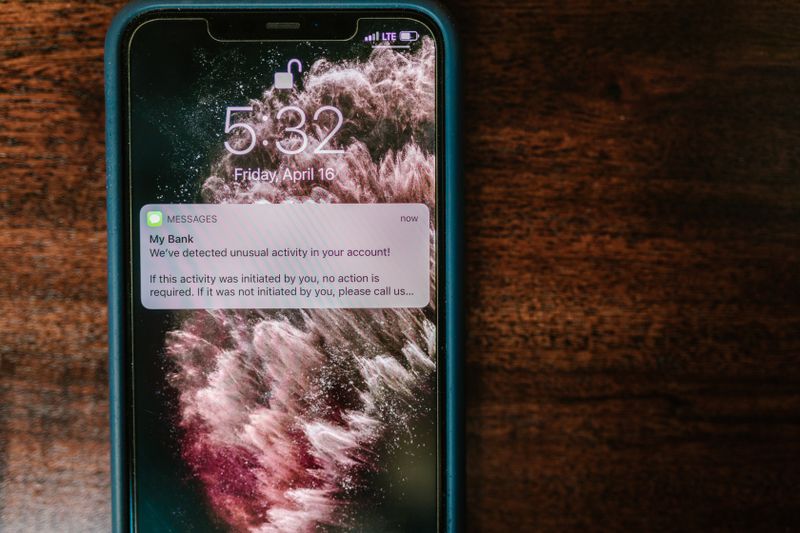
A phishing message arrives by email, by text message, or sometimes as a phone call. It almost always tries to make you feel one of two things: fear or excitement. A fearful message says your account has been locked, a payment failed, or someone logged in from another country. An exciting message says you have won a prize or are owed a refund. Both want the same thing, which is for you to click a link or call a number straight away.
When you click that link, you land on a web page that looks just like the real company's website. The logo is right, the colours are right, and there is a box asking for your username and password. The moment you type them in and press the button, those details go straight to the criminal, not to your bank. They now have everything they need to log into your real account.
Some phishing messages skip the link and ask you to reply with information, or to ring a number where a friendly-sounding person talks you through "securing" your account. The goal is always the same. They want to collect something valuable from you, whether that is a password, a card number, or a one-time code sent to your phone.
The warning signs to look for
The biggest clue is urgency. Any message that says you must act in the next hour, or your account will be closed, is trying to rush you past your own common sense. Real companies give you days or weeks, and they do it calmly. A countdown timer or the words "immediate action required" should make you suspicious, not scared.
Look closely at who sent the message. On a computer, you can rest your mouse over the sender's name without clicking, and the true email address appears. A message claiming to be from Apple but coming from "apple-security-team@mail-verify123.com" is fake. Banks and big companies use plain, short addresses that match their website, such as anything ending in "@apple.com".
Other clues add up quickly. The message greets you as "Dear Customer" instead of using your name. The spelling is slightly off, or the grammar feels clumsy. A link, when you hover over it, points to a strange web address that has nothing to do with the company. Any one of these on its own is a yellow flag. Two or three together mean you should delete the message.
How to check a link without getting caught
You never have to click a link to find out where it goes. On a computer, rest your mouse pointer on top of the link, but do not press the button. At the bottom of your screen, or in a little pop-up bubble, the real web address appears. If it does not clearly contain the company's normal website name, do not click it.
On a phone or tablet, press and hold your finger on the link instead of tapping it. A menu slides up showing the full web address. Read it carefully. The real company name should sit right before the ".com", like "amazon.com", not buried in the middle of a long messy address like "amazon.secure-login-check.com".
The different types you will run into
Phishing comes in a few flavours, and knowing their names helps you spot them. The table below covers the ones you are most likely to meet in your inbox or on your phone.
| Type | How it reaches you | Common disguise |
|---|---|---|
| Email phishing | Email inbox | Bank, Amazon, PayPal, a delivery company |
| Smishing | Text message | "Your parcel is held", a missed delivery, a toll charge |
| Vishing | Phone call | "Microsoft support", your bank's fraud team, the tax office |
| Spear phishing | Personalised email | A message using your real name or a family member's name |
Smishing, the text-message version, has grown fast because a phone screen is small and the full web address is easy to hide. A typical one claims a parcel could not be delivered and asks for a small fee. The fee is tiny on purpose, so you hand over your card details without thinking twice.
Spear phishing is the most personal and the most convincing. The criminal has found your name, perhaps from a public Facebook profile, and uses it to sound legitimate. A message that knows your name still deserves the same checks as any other. Knowing your name is easy. Knowing the security answer only your real bank would have is not.
What to do if a message looks suspicious
Stop and do nothing for a moment. The whole trick depends on speed, so the simple act of pausing defeats most of it. Do not click, do not reply, and do not call any number printed in the message itself. None of those steps can be undone once you have given something away.
If the message claims to be from your bank or a company you use, contact them yourself using a number or website you already trust. Type the bank's web address into your browser by hand, or ring the number on the back of your card. If the warning was real, they will see it on your account. Almost always, they will confirm the message was fake.
You can report the bad message too. Forward suspicious emails to your email provider's report button, or in the United States to reportphishing@apwg.org. Suspicious text messages can be forwarded to 7726, which spells "SPAM" on a phone keypad and reaches your mobile network's fraud team for free.
Simple habits that keep you safe
Three small habits stop almost every phishing attempt. First, never log in through a link in a message. Always go to the website yourself, by typing the address or using a bookmark you saved earlier. Second, turn on two-step verification for your email and bank, so a stolen password alone is not enough to get in. Third, when in doubt, ask someone you trust before you click anything.
If you ever do type your password into a fake page, do not panic, and do not feel ashamed. Change that password right away on the real website, and turn on two-step verification if you have not already. If card details were involved, ring your bank and they will cancel the card and send a new one. Acting quickly limits the damage almost completely.
Phishing works by rushing you, so your strongest tool is simply time. A message that demands you act this second is the one to trust least. Slow down, check the sender, check the link, and contact the company yourself. Do that, and the bait drifts past you untouched.
Common questions about phishing
Can I get caught out by a phone call rather than a message? Yes, and that version has a name: vishing. A caller pretends to be your bank's fraud team and says they have spotted a suspicious payment. They sound calm and helpful, then ask you to confirm your card number or a code they have just sent you. Your bank already knows your card number, so it would never ask you to read it back. Hang up and call the bank yourself on the number from your card.
What if I clicked a link but did not type anything in? You are very likely fine. The danger comes from entering your details or opening an unexpected attachment, not from the page loading. Close the page, and as a sensible precaution, run any updates your phone or computer offers. If you are worried, change the password for whatever account the message pretended to be from, using the real website.
How do scammers get my email address or phone number in the first place? Usually from a list bought cheaply after a company somewhere was hacked, or simply by guessing common addresses in bulk. It does not mean you have been singled out, and it does not mean your accounts are already broken into. It is the reason two-step verification matters so much: even with your email address and an old password, a scammer is stopped at the second lock.
🛠️ Free tools for this topic
No sign-up. They do the calculating and checking for you.
Published by the TechGranddad editorial team. Published July 30, 2026.
Editorial responsibility: see Imprint.
Spotted an error or have something to add? corrections@techgranddad.com
Simple Tech Tips, Weekly
One practical tip every week — video calls, smartphone tricks, and how to stay safe online. No jargon, no overwhelm.
🎁 Free bonus: The Senior Tech Starter Guide (PDF)
You might also like
You Clicked a Scam Link: What to Do Right Now
A calm, ordered emergency guide for after you click a scam link: disconnect, change exposed passwords, contact your bank, clean up the device, and report it.
Facebook Privacy Settings: A Plain-English Walkthrough
A plain-English walkthrough of the Facebook privacy settings that matter most: default post audience, friend requests, tag review, hiding personal details, and two-factor login.
The iPhone Security Settings Checklist Worth 20 Minutes of Your Time
Eleven iPhone settings control how safe your phone, accounts and money are. This plain-English checklist tells you exactly where to tap, in about 20 minutes.
📖 All articles on TechGranddad →
Browse our other articles